Showing posts with label Value Study. Show all posts

Thursday, November 29, 2012

Digital Tracing Paper

My dad taught me the usefulness of tracing paper in composition at an early age. Draw each of your elements on a pieces of paper and move them around until a pleasing composition happens. Painter X can do this stage perfectly and with greater freedom. The above image has the girl on one layer, the hawk on another, and the rough sketch of a castle on the bottom layer. I could have left them all as rough sketches but I was tempted to render them and combine the layout stage and the charcoal value stage. I think it works well. All I have to do now is print it out and pin it beside my easel. I can even print multiples of this so I can work up a few color studies by painting right on top of it (mount the paper to foam-core and hit it with a layer of workable fixatif first, tho). If you look at the hawks legs, you can see they are all wrong. Changing those would be frustrating with tissue paper but I can now select the legs and rotate/distort them into a correct position... something tracing paper just can't do!

Another benefit of using Painter X at the layout stage is the Divine Proportion and Layout Grid tools. (menu: Window>Show Divine Proportion and Show Layout Grid.)

I situate the divine proportion on my canvas and it helps me imagine a layout (click to enlarge image below):
Sketch using the Divine Proportion overlay tool in Painter X

I also use the Layout Grid to help divide my canvas into thirds (rule of thirds):
Sketch divided into thirds.
All of this is incredibly freeing. I hope everyone who can will try this out. (Note that the divine proportion grid and the rule of thirds grid can be done without the computer's help)

Thursday, April 7, 2011

Train: Pencil Sketch

As I mentioned in my earlier post, I did a pencil sketch of the train before quoting a price. This is a good practice when you haven't drawn something before. It gives you a good idea of what will be involved because a thing often seems simpler in our heads than it does in reality. I discovered whilst doing this sketch that I don't like drawing trains, but I know from experience that you must be enthused about any piece of artwork you're doing. If you aren't enthused or happy about your artwork, it will show. Emotions come through. So I struggled to finde something to get excited about in this train (it wasn't until the underpainting that I really got excited).

 This sketch took me about an hour and a half to do and I was mostly concerned with getting the larger doo-dads down. This also gave me a good idea on what details I didn't need.

Friday, March 4, 2011

Digital Identity

Oils look like oils. Watercolors like watercolors. Ducks are ducks and armadillos are...well...strange. At any rate, things should look like what they are. So what are digital paintings? This is the question I've been struggling with lately.


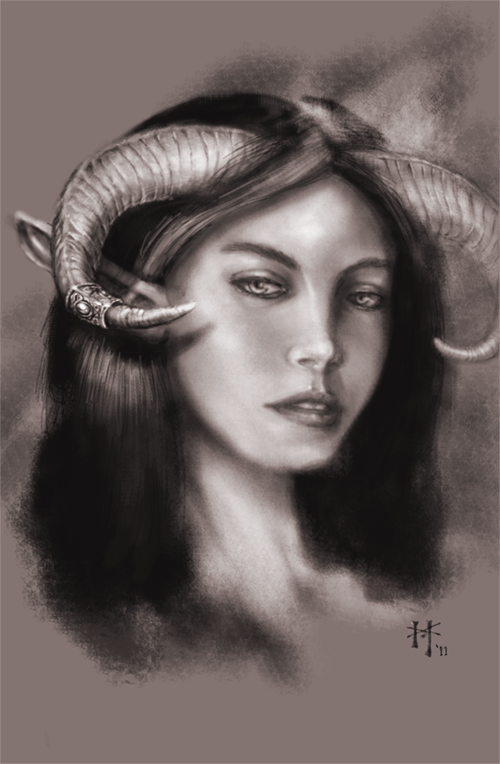
Before I go further, here's a piece I did in Photoshop to become familiar with digital drawing:

I instinctively went for a charcoal look. I did this test piece in the same manner that I would do a tonal study of a subject before I painted it. This begs the question: Why didn't I just use paper and some charcoal? It would certainly have looked better. I've seen other digital pieces where the artist has emulated everything from oils to colored pencil. Digital art is a changeling that we're never quite sure of it's original form.


I quickly came to the conclusion, after doing my digital charcoal study, that trying to emulate a physical painting medium is just a waste of time and electricity. If you want an oil painting, go paint in oil. So then what's the use of digital painting? Surely not to save us from breathing in Turpenoid or cleaning brushes (both activities are highly enjoyable for me, btw). Digital painting has it's own 'look' as distict from oils as watercolor is from pastel. Digital paint is bright and slick. It's textures overlapping shapes. It's beautiful chaos made from mathematicaly precise brushes and stock textures. It's a highly-stylized view of life, painted with light.


The real identity of digital art isn't to emulate a physical medium. Some may argue the point, but let them rant. The most basic rule of art is 'know your medium; know your tools'. You want oils? Break out the linseed and canvas. You want watercolor? Go soak your paper and prepare for many washes of color. You want slick, bright, high-tech, textures and lines assaulting your grill? Pick up the Wacom, my friend and jump into the matrix. Now, after I've spent a thousand words on this, here's a picture. Or two. Alright, here are two websites that will show you what digital art is.


http://androidjones.net/


http://artizako.cgsociety.org/gallery/